UI/UX Designer using AI Automation
I Build Designs.
I Also Make Sure
They Actually Work.
Most designers hand off and hope for the best. I built a fully automated QA system using Ghost Inspector and Claude AI that verifies every page, every pop-up, and every interaction was delivered exactly as I designed it with only a minimal final check needed from me at the end. The site had over 200 pages covering everything from product listings and checkout flows to video guides, support documentation, and software user guides.
My Role
UI/UX Designer
Tools Used
Ghost Inspector + Claude AI
Tests Built
413
Pages Covered
200+
↓ Read the story
Case Study
UI/UX + AI + QA Automation
01 The Problem
Designs ship.
Things break quietly.
After a development handoff, things break in ways that are easy to miss. These kinds of issues are not caught in a standard dev review because developers test functionality, not design intent.
But manually verifying 200 pages across desktop and mobile after every single deployment is hours of work. It is also inconsistent by nature
What I needed was a way to turn my design knowledge into automated tests. Tests that run after every deployment.
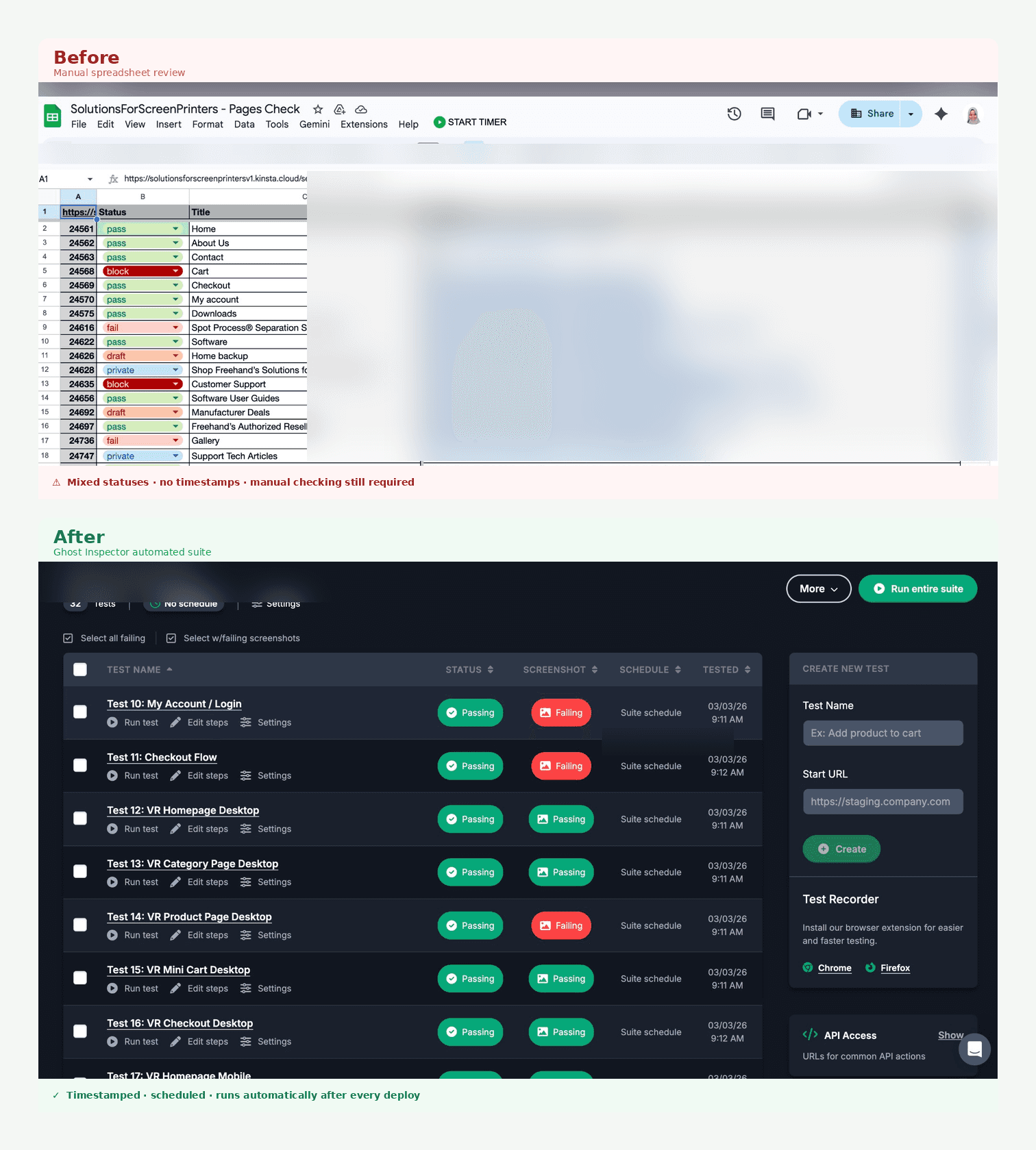
Manual QA is partial by nature. Automated QA is complete by design.
03 My Approach
Think like a designer.
Test like a machine.
The first question was not how to build the tests. It was what to test. A 200+ page site cannot be covered at equal depth everywhere. I prioritized coverage based on how much a broken experience on any given page would hurt a real user and the business behind it.
Interactive components first
Mini cart open state, off-canvas mobile menu, navigation drawer, wishlist page.
Commerce and conversion pages
Product pages, checkout, cart, free trial pages. A broken experience here has a direct revenue impact.
Marketing and support content
Testimonials, downloads, software guides, support library. Important for user trust and organic search performance.
Deep documentation as sampled coverage
The site has 100+ video and guide sub-pages. Rather than testing every individual URL, I tested section landing pages plus a representative sample from each category.
Every test follows a pattern that mirrors exactly how I would manually review a page.
Base Test Pattern for Every Page
// Open the page
{ "command": "open", "value": "/page-path/" }
// Screenshot as visual proof it rendered correctly
{ "command": "screenshot" }
// Confirm a reliable core element is present
{ "command": "assertElementPresent", "target": "main" }
03 Where AI Came In
Claude wrote the tests.
I directed the thinking.
Writing 50+ Ghost Inspector tests by hand in JSON is technically possible. But the time cost makes it the kind of task that never actually gets done. That is exactly where Claude AI became a genuine force multiplier. I described what I needed in plain language, and Claude generated the complete test JSON, suggested the right CSS selectors for the Blocksy WordPress theme, and flagged which assertions should be hard failures versus optional.
Claude handled the translation from design intent to working test
code. I stayed focused on knowing what to test and why it mattered.
✓
Identified the correct CSS selectors for Blocksy theme components without requiring manual DOM inspection for every element
✓
Generated complete Ghost Inspector JSON payloads with correct step format, sequence numbers, and
optional flags ready to deploy via the API immediately
✓
Structured the prioritization logic across 200+ pages so coverage was meaningful rather than just large in number
✓
Built the sampled documentation approach that kept the suite manageable without losing meaningful coverage of deep content sections
✓
Provided the exact API calls needed to create new tests, update existing ones, and trigger full suite execution
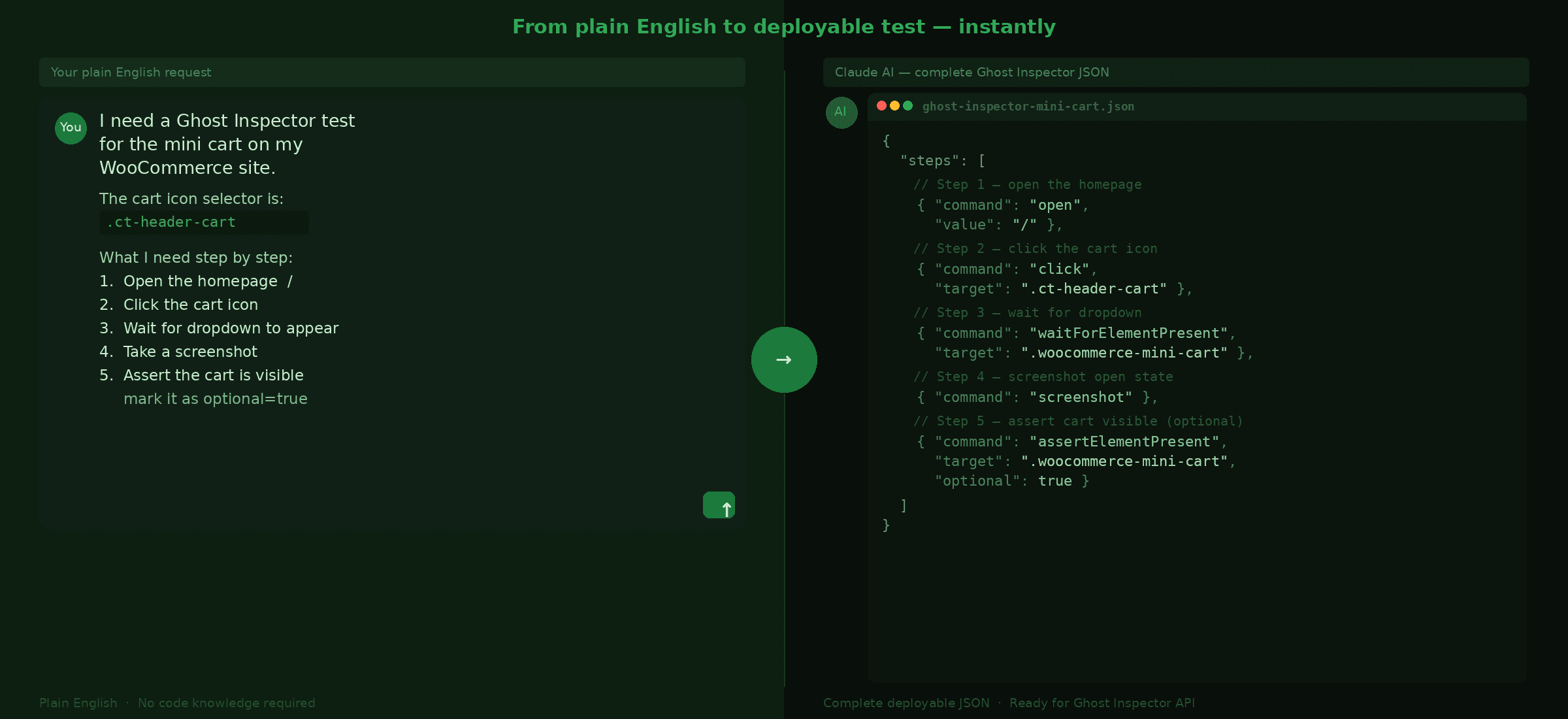
The Claude AI conversation was the bridge between design knowledge and working test code. Context in, deployable tests out.
04 Testing Interactions
Not just pages.
The states inside them.
The most important shift in this project was testing actual UI interactions. What this system checks is whether clicking the cart icon opens the cart, whether the mobile menu drawer animates in fully, and whether the close button on that drawer responds. These are the things that reflect design intent and they are the things that most QA processes skip entirely.
Mini Cart Open State
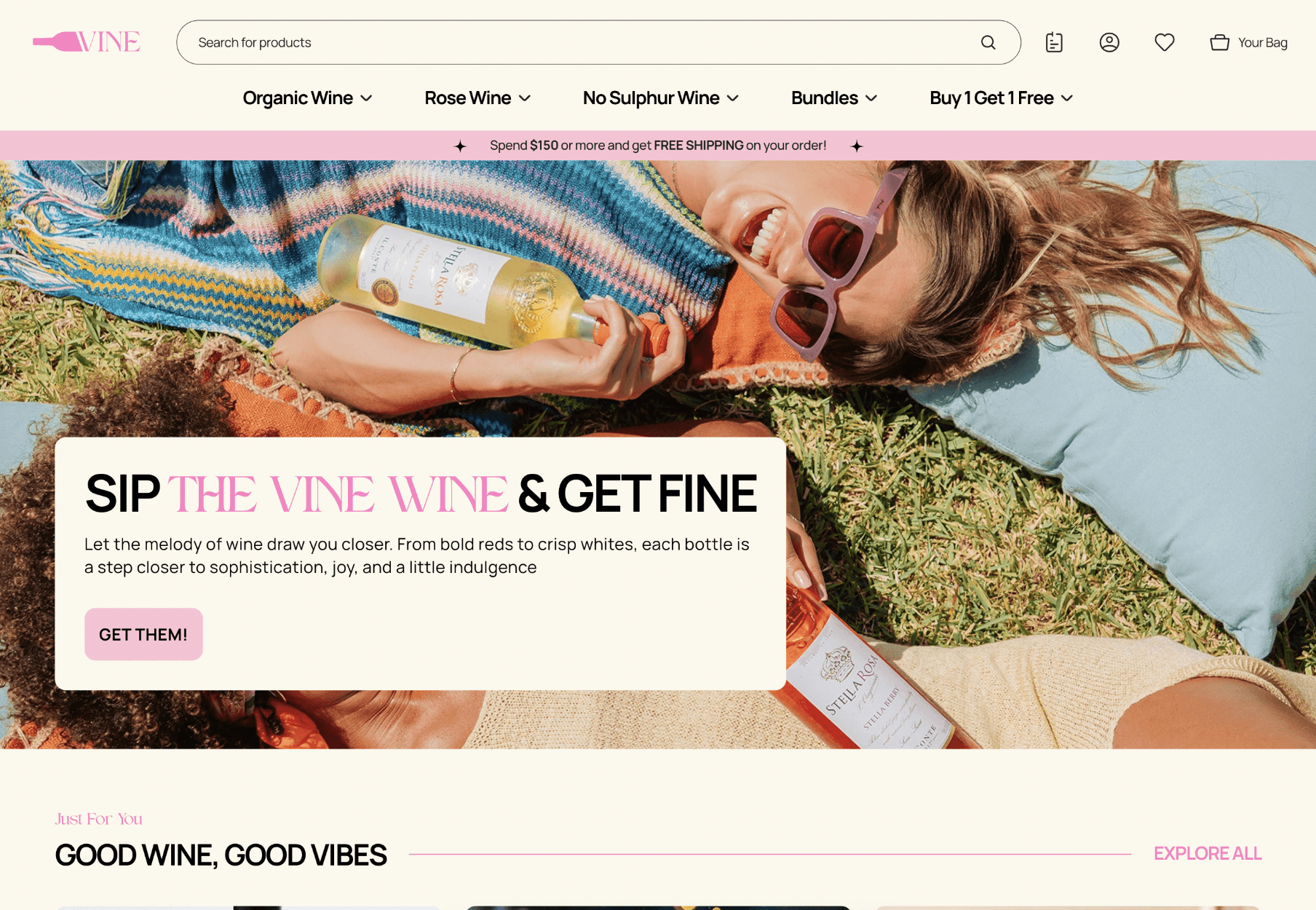
The original test suite had mini cart tests, but they only confirmed the cart widget existed somewhere in the DOM. They never triggered the open state. I rewrote them to simulate exactly what a real user does: land on a page, click the cart icon, wait for the dropdown to appear, and capture a screenshot of the live open state.
Mini Cart Interaction Test — Desktop at 1280x800
// Land on the homepage
{ "command": "open", "value": "/" }
// Click the header cart icon
{ "command": "click", "target": ".ct-header-cart" }
// Wait for the dropdown to fully appear
{ "command": "waitForElementPresent",
"target": ".woocommerce-mini-cart" }
// Screenshot the open state — this is the design being verified
{ "command": "screenshot" }
// Assert cart content is present as a soft check
{ "command": "assertElementPresent",
"target": ".woocommerce-mini-cart",
"optional": true }
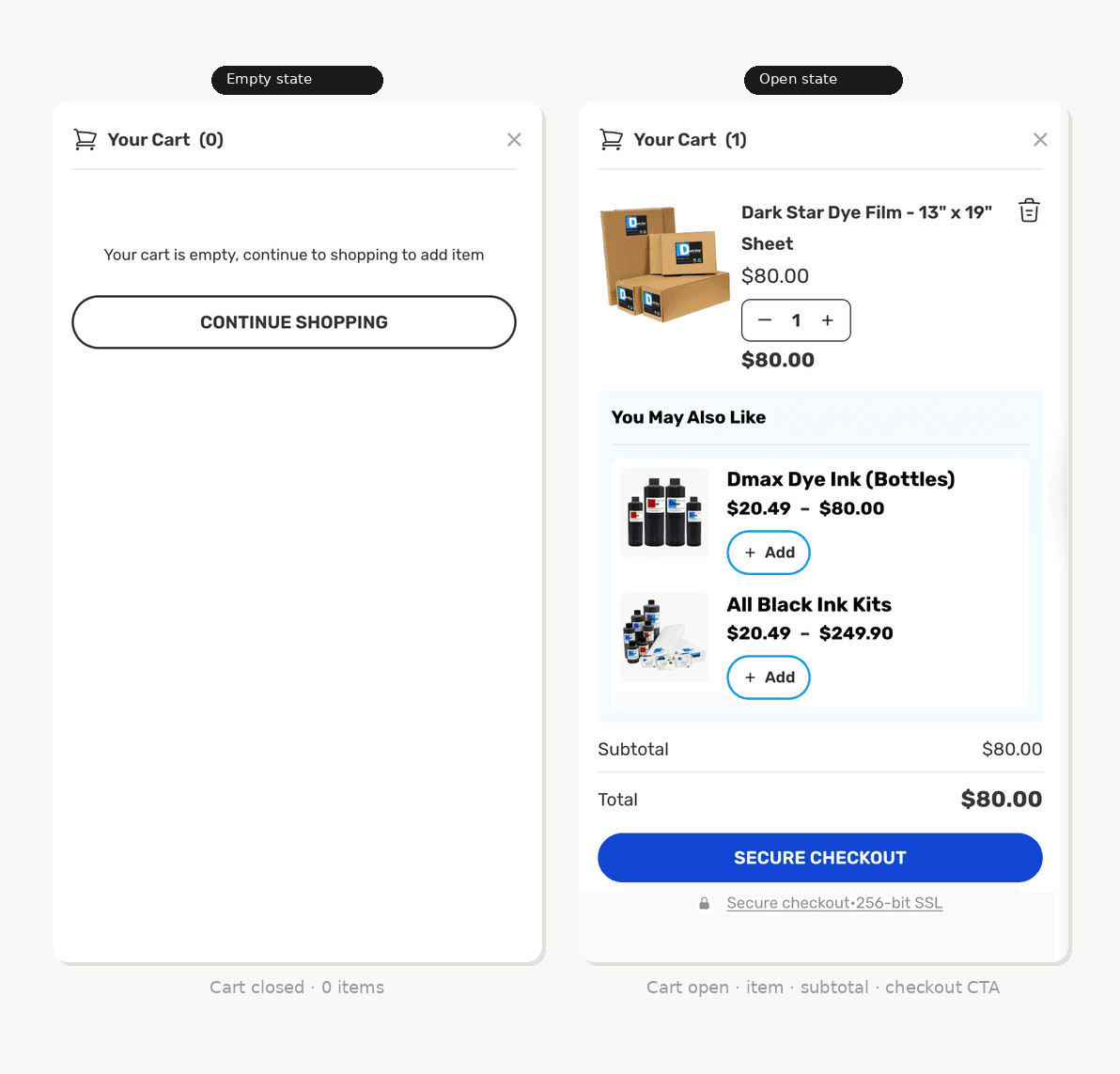
The test captures the full open state of the mini cart. This is the state I designed. This is what the test verifies every time.
Mobile Off-Canvas Navigation
At 375x812 viewport, the navigation collapses into an off-canvas drawer triggered by a hamburger icon. This is one of the most visually distinctive components on mobile. The test clicks the toggle, waits for the drawer to animate in completely, and screenshots the full open state. Desktop and mobile are treated as completely separate test contexts because their failure modes have almost no overlap.
05 The Result
A full site under
automated watch.
413
Tests after the build-out
2x
Desktop and mobile pairs
for every key interaction
200+
Pages with verified
coverage
Every major page category now has a defined test strategy. Interactive commercial pages get both desktop and mobile variants. Marketing and educational pages get standard desktop tests. Deep documentation sections get sampled coverage that stays representative without being exhaustive.
Running the entire suite is a single API call. Ghost Inspector spins up headless Chrome instances, visits every page, triggers every interactive component, and returns pass and fail results with screenshots at each step. When something fails, I know exactly which step broke and what the browser saw at that exact moment. The manual review I do afterward is minimal, a quick scan of flagged items rather than a full site walkthrough from scratch.
Execute the Full Suite via API
curl -s "https://api.ghostinspector.com/v1/suites/[SUITE_ID]/execute/
?apiKey=[API_KEY]&immediate=1"
07 Impact
Design intent.
Actually protected.
From reactive to proactive.
Before this system, catching a broken interaction meant someone had to stumble across it — a designer, a client, or a real user. After this, the system catches it automatically right after deployment, before anyone else sees it.
~3
Hours of full manual QA review
per deployment
90
Automated checks running
across the full site
100%
Of interactive components
verified in their designed open
states
✓
Every interactive UI state including open cart, open menu, open drawers, and wishlist is verified after
every single deployment
✓
Visual regressions are surfaced automatically before any client or end user encounters them
✓
Desktop and mobile parity is verified programmatically rather than assumed or spot-checked
✓
Design intent is codified in running tests, not just documented in a Figma file that nobody checks against
✓
The development team receives specific failure context the exact step, selector, and viewport instead of vague reports that something looks wrong
08 What This Shows
A designer who owns
the full delivery.
Most designers consider the job done when the design file is handed over. I consider it done when the experience is working correctly in the browser, at every viewport, on every page, after every deployment. That is a fundamentally different standard, and this project is evidence that I hold myself to it.
Building this system required thinking like a designer, a QA tester, and a systems thinker at the same time. Understanding the design deeply enough to know what "correct" looks like. Understanding the site structure well enough to prioritize coverage where it matters most. And using AI tools well enough to turn weeks of potential manual work into something that runs in five minutes.
Interactive states over page loads
Pages load. The things that break are the
interactive states, open carts, expanded
menus, triggered drawers. Always start the test
suite there.
AI as execution, designer as direction
Claude generated the tests. I decided what to
test, why it mattered, and what good coverage
looked like. The combination is what made this
scalable.
Mobile is a separate product
Desktop and mobile have completely different
failure modes. They need separate test contexts,
not a shared one.
Soft assertions reduce noise
Marking dynamic content as optional keeps the
suite trustworthy. A test that false-fails constantly
is worse than no test at all.
Automated QA is not a developer tool that designers happen to use. It is a design tool. It is how you make sure what you designed is what actually got built.
If it is not tested,
it is not done.
3 Ways I Can Help You
Product. Website. UX Audit.
🎨 My product design services focus on creating intuitive and aesthetically pleasing products that resonate with your audience and stand out in the market.